This thing is amazing! I just found this on Think Geek. The entire purpose of this small keychain-sized device is to detect WiFi networks. Here is an excerpt from the description found here:
Your typical WiFi detector will only show the presence of a signal and relative signal strength. This Wi-Fi Digital Hotspotter, from Canary Wireless, has a 12-character LCD that provides information on signal availability and strength as well as essential network information, including SSID, security status and channel. When multiple networks are present the LCD will allow you to scroll through information for each network.
I can only imagine what fun this would be. I think as soon as I get 60 dollars, I'll get one of these.
Monday, July 10, 2006

Wireless Connection Failing You?
I have heard several complaints in the past couple days about people havign trouble maintaining their wireless connection while using a Linksys Wireless Router. So I went to the Linksys website and found this gem for a WRT54G router, but I am assuming it works on all Linksys routers the same.
"If your wireless signal is intermittent, then you are most likely you are
experiencing 2.4 GHz interference. You will need to try switching channels
and changing the SSI D on your WRT54G. The best channels are 1, 6 and 11. To
switch channels:
1. Using a computer that is plugged into the router directly with a
network cable, open a web browser.
2. In the Address Bar type http://192.168.1.1 and press Enter.
3. A box should appear asking for a User Name and a Password.
Leave the User Name field empty, and type your WRT54G router password into
the Password field (the default Password is admin) and click the OK
button or press [Enter].
4. The WRT54G Setup page should now appear. Click onto the Wireless
page.
5. When the Wireless†page loads, you should be on the Basic Wireless
Settings sub-section.
6. Look for the Wireless Channel†option. The default channel is set
to “6 - 2.437GHz. Change it to either 1 - 2.412GHz, or 11 - 2.462GHz.
7. Click on the Save Settings button toward the bottom of the page to
save changes. Click Continue when prompted to reload the page.
8. The channel of your WRT54G has now been changed. Restart your
wireless computers so that they can automatically connect using the new
channel.
9. If you still experiencing interference using channels 1, 6, or 11,
try switching the router to the other channels as well (2, 3, 4, 5, 7, 8, 9,
10) and find one that captures a good connection".
"If your wireless signal is intermittent, then you are most likely you are
experiencing 2.4 GHz interference. You will need to try switching channels
and changing the SSI D on your WRT54G. The best channels are 1, 6 and 11. To
switch channels:
1. Using a computer that is plugged into the router directly with a
network cable, open a web browser.
2. In the Address Bar type http://192.168.1.1 and press Enter.
3. A box should appear asking for a User Name and a Password.
Leave the User Name field empty, and type your WRT54G router password into
the Password field (the default Password is admin) and click the OK
button or press [Enter].
4. The WRT54G Setup page should now appear. Click onto the Wireless
page.
5. When the Wireless†page loads, you should be on the Basic Wireless
Settings sub-section.
6. Look for the Wireless Channel†option. The default channel is set
to “6 - 2.437GHz. Change it to either 1 - 2.412GHz, or 11 - 2.462GHz.
7. Click on the Save Settings button toward the bottom of the page to
save changes. Click Continue when prompted to reload the page.
8. The channel of your WRT54G has now been changed. Restart your
wireless computers so that they can automatically connect using the new
channel.
9. If you still experiencing interference using channels 1, 6, or 11,
try switching the router to the other channels as well (2, 3, 4, 5, 7, 8, 9,
10) and find one that captures a good connection".
Friday, July 07, 2006
Internet Explorer Beta 3
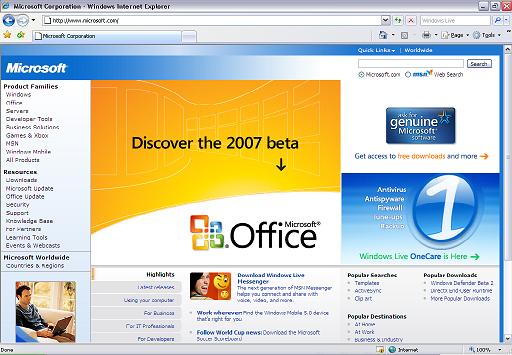
I downloaded Internet Explorer Beta 3 yesterday, and...i am ashamed to say...I like it.
Haha, Microsoft has apparently taken the hint that people are flocking to the versatility of Mozilla Firefox because IE Beta 3 looks and feels a lot like Mozilla Firefox, except for the traditional box-iness that is IE.

Haha, Microsoft has apparently taken the hint that people are flocking to the versatility of Mozilla Firefox because IE Beta 3 looks and feels a lot like Mozilla Firefox, except for the traditional box-iness that is IE.
Friday, April 14, 2006
HTML:
Alright, a lot of people are using sites such as MySpace, and this requires a certain competancy at HTML. HTML codes use tags, there's a beginning tag <b> and an end tag </b>
Here are some basic html commands:
<b>: makes text bold <b>bold text</b>
<u>: makes text underlined <u>underlined text</u>
<i>: makes text italic <i>italic text</i>
<a>: makes a link <a href="http://www.websitetobevisited.com">hyperlink text</a>
<img src="">: Displays an image <img src="Link to image" />
<p>: makes a new paragraph;
<br>: makes a line break
<bgcolor>: changes background color
<text>:changes text color
This is all pretty straightforward, I'll make a more advanced tutorial with codes that are more "fun" per se.
'Till next time...
Here are some basic html commands:
<b>: makes text bold <b>bold text</b>
<u>: makes text underlined <u>underlined text</u>
<i>: makes text italic <i>italic text</i>
<a>: makes a link <a href="http://www.websitetobevisited.com">hyperlink text</a>
<img src="">: Displays an image <img src="Link to image" />
<p>: makes a new paragraph;
<br>: makes a line break
<bgcolor>: changes background color
<text>:changes text color
This is all pretty straightforward, I'll make a more advanced tutorial with codes that are more "fun" per se.
'Till next time...
Make Windows XP Run Faster:
In WindowsXP, as in other versions of Windows, you can make Windows run faster using the MSConfig Utility. This utility can be used to stop programs from starting when Windows boots. You can stop spyware, adware, and unwanted programs by doing the following:
To access this utility Click Start(Fig.1)>Run>type "msconfig"(Fig.2)
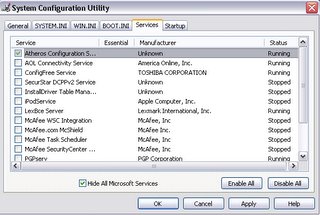
Then click the tab that says Startup. unselect all the checked boxes.(Fig.3) I suggest not unselecting things such as Norton Antivirus or Mcafee Antivirus.
Fig.1:
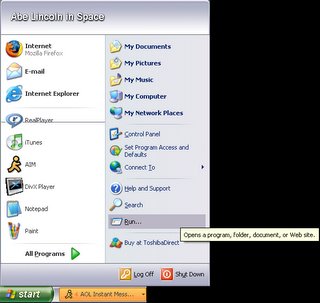
Fig.2:

Fig.3:
If you get an error such as this,
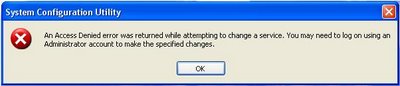
then you need Administrator privileges to access the MSConfig Utility. Talk to your System Administrator about that.
To access this utility Click Start(Fig.1)>Run>type "msconfig"(Fig.2)
Then click the tab that says Startup. unselect all the checked boxes.(Fig.3) I suggest not unselecting things such as Norton Antivirus or Mcafee Antivirus.
Fig.1:
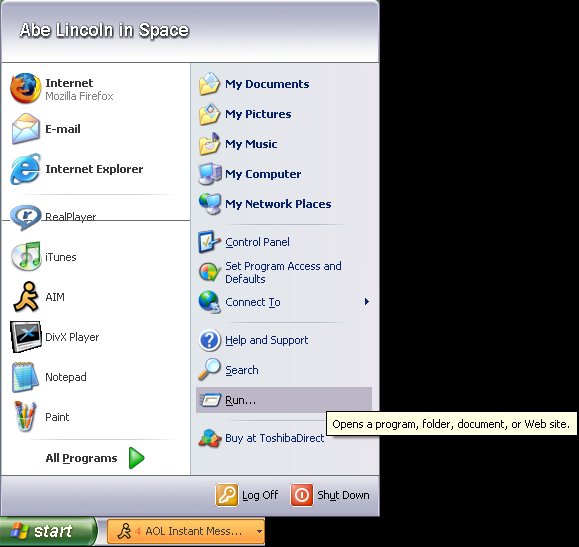
Fig.2:

Fig.3:
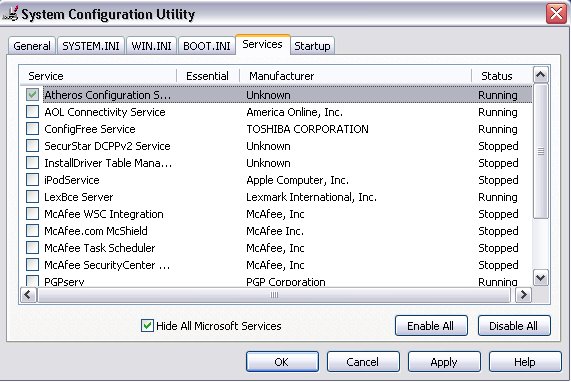
If you get an error such as this,

then you need Administrator privileges to access the MSConfig Utility. Talk to your System Administrator about that.
Tuesday, April 11, 2006
2600
I have to tell you all about the magazine 2600. This magazine, called "The Hacker Quarterly" is extremely informative, even to non-hackers.
So if you are interested, visit www.2600.org or go to your local Barnes&Noble or Borders.
So if you are interested, visit www.2600.org or go to your local Barnes&Noble or Borders.
Wow
So, it's been a while. I've cut down on my computers, getting rid of the one without a modem/HDD/memory. Yea it was pretty much an antique motherboard with a case. Haha.
So yea, I gave up on the server idea, and I've gotten more into programming again. w00t.
I've pretty much got HTML down, as well as a few of the BASIC languages. Now im trying to learn C++, notice the word "trying". Haha.
Well I'm out for now,
Colin
So yea, I gave up on the server idea, and I've gotten more into programming again. w00t.
I've pretty much got HTML down, as well as a few of the BASIC languages. Now im trying to learn C++, notice the word "trying". Haha.
Well I'm out for now,
Colin
Tuesday, January 17, 2006
Server!!
heyy everyone, its been a while since ive updated my blog, but im hoping to update it more often now. =D
I'd just like to let people know, im making a webserver. I kinda started this because i was bored one day haha. Yea, it will be running Centos soon...maybe? haha it currently has ubuntu server, but i think im going to change it over to a centos minimal install.
wish me luck =P
-Colin
I'd just like to let people know, im making a webserver. I kinda started this because i was bored one day haha. Yea, it will be running Centos soon...maybe? haha it currently has ubuntu server, but i think im going to change it over to a centos minimal install.
wish me luck =P
-Colin
Saturday, December 10, 2005
Telnet...
Heres one of the few topics where I have a vague knowledge of something...
I have been hearing lately about people trying to use telnet to access websites. This isn't going to work, Telnet is a program used to gain remote administrator access to a computer.
Telnet uses a computers ports to connect to the machine. The default telnet port is 23. First we will need to get to the telnet screen. The easiest way to do this is to go to the command prompt by clicking Start->Run->type "command" or "cmd"(if in WinXP). When you get to the command prompt you should see this:
C:\>_
There may be more folders such as:
C:\Documents and Settings\Colin>_
It will still work.
At the prompt type telnet iraq.org...
C:\>telnet iraq.org
...and hit enter. You should see:
--------------------------
FreeBSD/i386 (arabinfo.org) (ttyp0)
login:_
As you can probably guess, you cant log in if you dont know the username and password.
Say we did know the username and password, we would type them in, and we would get command prompt access to the computer. This allows you to install/uninstall software, run programs, and do pretty much anything you can do at a MS-DOS command prompt.
You can do this entire process from the bash prompt in linux, but I'm not as familiar with linux as I am with Windows.
This was a very basic telnet tutorial, but as it is 1:36am, I am exhausted and I don't want to type a whole lot. You can get more information about telnet by typing "telnet /?" at the command prompt.
have fun,
Colin
I have been hearing lately about people trying to use telnet to access websites. This isn't going to work, Telnet is a program used to gain remote administrator access to a computer.
Telnet uses a computers ports to connect to the machine. The default telnet port is 23. First we will need to get to the telnet screen. The easiest way to do this is to go to the command prompt by clicking Start->Run->type "command" or "cmd"(if in WinXP). When you get to the command prompt you should see this:
C:\>_
There may be more folders such as:
C:\Documents and Settings\Colin>_
It will still work.
At the prompt type telnet iraq.org...
C:\>telnet iraq.org
...and hit enter. You should see:
--------------------------
FreeBSD/i386 (arabinfo.org) (ttyp0)
login:_
As you can probably guess, you cant log in if you dont know the username and password.
Say we did know the username and password, we would type them in, and we would get command prompt access to the computer. This allows you to install/uninstall software, run programs, and do pretty much anything you can do at a MS-DOS command prompt.
You can do this entire process from the bash prompt in linux, but I'm not as familiar with linux as I am with Windows.
This was a very basic telnet tutorial, but as it is 1:36am, I am exhausted and I don't want to type a whole lot. You can get more information about telnet by typing "telnet /?" at the command prompt.
have fun,
Colin
Some of my interests....
Hello again...I decided to share some of my interests. Well I am interested in computer security, I'm not a hacker by any stretch of the imagination, but I do find it facinating. Phreaking is interesting, not very practical though. One thing I do like a lot is vintage computers. I use the term vintage because piece of crap just doesnt sound very cool. But I love to take apart old computers and put them back together. I love linux distros and I really dislike Windows. :-P Now you know me just a little better, and soon I will have something to say that is actually interesting haha.
-Colin
-Colin
Friday, December 09, 2005
A Little Background...
I decided that to fully understand this blog, you should understand a little about me. :-P My name is Colin, as you know, and I'm 16 years old. I love computers and pretty much anything technological. I enjoy repairing computers and writing some small programs in the basic languages. Im working on getting my A+ Certification and hopefully soon I will get my MCSE Certification. I like vintage computers the best, but i have all kinds of computers at my house.
MY EQUIPMENT:
I have quite a few parts and computers....im not going to write the amounts of RAM or HDD space because it fluctuates quite frequently...
I also havve a few old computers that are in pieces because I used them for parts, but they dont count. :-P Thats all for now...
-Colin
MY EQUIPMENT:
I have quite a few parts and computers....im not going to write the amounts of RAM or HDD space because it fluctuates quite frequently...
- Dell Dimension 4500 running WinXP
- eMachines PC running Win98
- Gateway Solo 1100 Notebook running Win98SE sometimes, RedHat sometimes, and WinMe sometimes...depends on the day haha, and theyre not multi-booted. :-P
- IBM Thinkpad 755CD (first IBM laptop with a CD drive :-P) running Win95
- A few hundred CD's including several versions of WIndows and around 15 or 20 Linux Distros
- Hundreds of small parts and gadgets that I will hopefully use someday...
- I have a Cable Internet connection...not sure of the speed, but I think its around 3Mbps
I also havve a few old computers that are in pieces because I used them for parts, but they dont count. :-P Thats all for now...
-Colin
My First Post
Hello everyone, this is Colin. This will probably be a mostly technological blog, but I will probably get random at times and make a post about anything :-P So, if you actually came to my blog and are reading this...thank you :-D
-Colin
-Colin
Subscribe to:
Posts (Atom)

